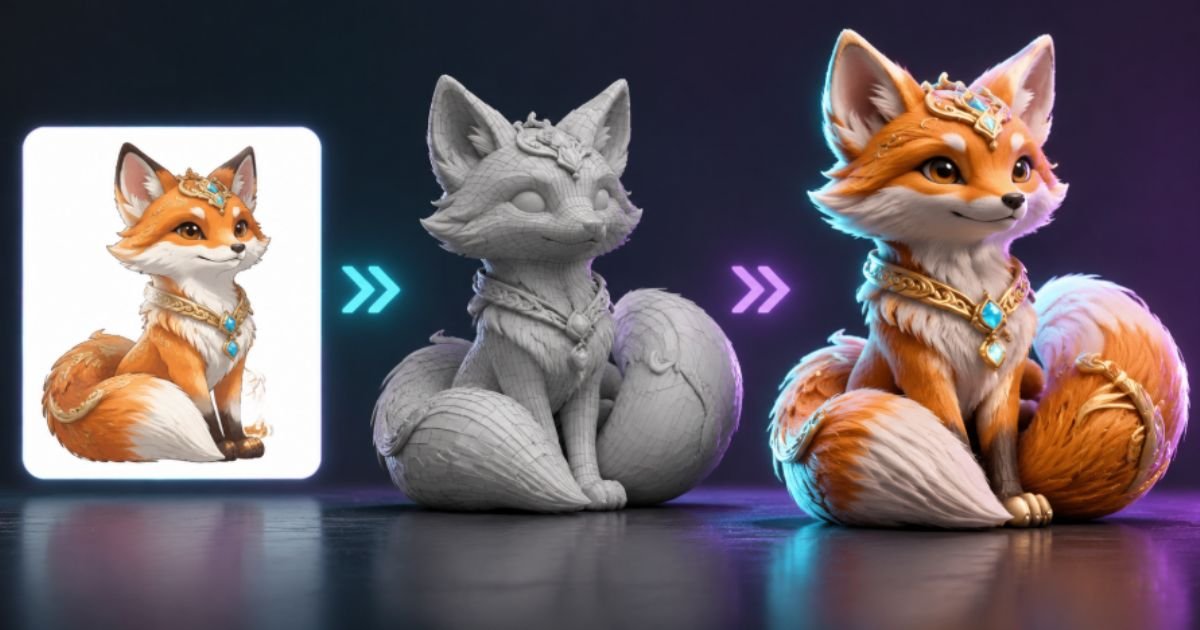

Creating realistic 3D models used to require specialized software, advanced technical knowledge, and hours of manual work. Today, artificial intelligence is changing this process by making 3D modeling faster, more accessible, and easier for beginners and experienced designers alike. Whether you are a game developer, digital artist, product designer, or content creator, AI-powered tools can help turn creative ideas into detailed 3D assets.
Two technologies are particularly important in this transformation: converting images into three-dimensional models and applying realistic textures using artificial intelligence. Together, they simplify the traditional 3D production workflow and open new possibilities for digital creativity.
How Does Image to 3D Model Technology Work?
Traditional 3D modeling involves manually creating objects using vertices, edges, polygons, and different modeling techniques. Although this approach offers considerable creative control, it can be time-consuming, especially when working with complex objects.
An image to 3D model solution uses artificial intelligence to analyze a two-dimensional image and generate a corresponding three-dimensional representation. Instead of building an object from scratch, users can upload an image and let AI interpret its visual features to create a 3D asset.
The technology analyzes different visual elements, including:
- Object shape and overall structure.
- Visible edges, contours, and proportions.
- Surface details and visual characteristics.
- Lighting and shading information.
- Spatial relationships between different parts of an object.
Based on this information, the AI generates a 3D representation that can be used in various digital projects.
For example, a product photograph can become a 3D asset for an online store, while an illustration of a fictional character can serve as a starting point for a game development project.
Why AI-Powered 3D Modeling Is Becoming Popular
The growing popularity of AI-powered 3D modeling comes from its ability to reduce the technical barriers associated with traditional workflows.
Previously, creating a detailed 3D object required familiarity with professional modeling applications and a considerable amount of practice. AI tools simplify the initial creation process, allowing users to focus more on their creative ideas.
Here are some important advantages.
1. Faster 3D Asset Creation
Time is an important consideration in professional design and development projects. Manually creating every object can slow down production, particularly when working with large collections of assets.
AI-powered image conversion helps accelerate the initial modeling process. Designers can generate a starting model from an existing image and then refine it according to their requirements.
2. Beginner-Friendly Workflow
Not everyone interested in 3D design has professional modeling experience. AI-powered tools make the technology more accessible by reducing the need for advanced technical skills during the initial creation process.
Beginners can experiment with different images and explore 3D modeling without first mastering complicated modeling techniques.
3. More Creative Possibilities
Artists and designers can experiment with different concepts, shapes, and visual styles. An ordinary photograph can become the starting point for a digital sculpture, game asset, product visualization, or animation project.
4. Improved Production Efficiency
Businesses working with digital products, advertising, e-commerce, and interactive experiences can benefit from faster asset generation. AI-assisted workflows help reduce repetitive tasks and provide more time for creative development.
Understanding the Importance of AI Texturing
Creating the geometry of a 3D object is only one part of the modeling process. A model also needs an appropriate surface appearance to look realistic and visually appealing.
This is where texturing becomes important.
In traditional 3D workflows, artists manually create and apply textures to models. They work with materials, colors, roughness, reflections, and surface details to achieve the desired appearance.
However, this process can become complicated when working with multiple objects or highly detailed environments.
AI texturing introduces artificial intelligence into this stage of production. It helps generate or apply suitable surface textures based on visual references, descriptions, or the characteristics of a 3D object.
Depending on the tool and workflow, AI can assist with creating materials that resemble:
- Wood with natural grain patterns.
- Metal with realistic reflections.
- Stone with detailed surface variations.
- Fabric with visible fibers and woven patterns.
- Plastic with smooth or glossy finishes.
- Skin and organic materials with natural-looking details.
This makes it easier for creators to develop visually interesting 3D assets without manually designing every surface from the beginning.
How Image Conversion and AI Texturing Work Together
The combination of image-based 3D generation and AI-assisted texturing creates a more streamlined production workflow.
Consider a simple example: a designer wants to create a realistic 3D model of a wooden chair.
First, the designer uploads a photograph of the chair to an image-to-3D conversion tool. The AI analyzes its visible structure and generates an initial three-dimensional model.
Next, the designer improves the model’s appearance by applying suitable textures. AI-assisted texturing can help create realistic wooden surfaces, natural color variations, and material details.
Finally, the designer reviews the model, adjusts any necessary elements, and exports it for use in a compatible 3D application.
This workflow can be useful for:
- Video game asset development.
- Product visualization and e-commerce.
- Animation and filmmaking.
- Architectural visualization.
- Digital art and creative projects.
- Virtual reality and augmented reality experiences.
Although AI can automate important stages, professional review and refinement remain essential for achieving accurate geometry, clean topology, and production-ready results.
Practical Tips for Getting Better AI-Generated 3D Models
The quality of an AI-generated model depends on several factors, including the input image, object complexity, and the capabilities of the generation tool.
Here are some practical tips to improve your results.
Choose Clear Reference Images
Start with a high-quality photograph where the main object is clearly visible. Avoid images with excessive background clutter, overlapping objects, or unclear boundaries.
Use Good Lighting
Images with balanced lighting generally make it easier for AI systems to identify object shapes and surface details. Extremely dark photographs or strong shadows can affect the interpretation of certain features.
Focus on Simple Objects First
If you are new to AI-based 3D generation, begin with simple objects such as furniture, household products, toys, or decorative items. Once you understand the workflow, experiment with more complex subjects.
Review the Generated Geometry
AI-generated models may contain imperfections, missing details, or inaccurate proportions. Always inspect the geometry before using a model in professional projects.
Select Appropriate Textures
Texture selection should match the material and intended use of the object. For example, a wooden table should have a suitable wood texture rather than a highly reflective metallic surface.
The Future of AI in 3D Modeling
Artificial intelligence is gradually becoming an important part of digital content production. As generative technologies improve, the process of creating, modifying, and texturing 3D objects is expected to become more efficient and accessible.
For independent creators, this means more opportunities to experiment with 3D design without investing years in learning every technical aspect of traditional modeling.
For businesses, AI-assisted production can help accelerate product visualization, marketing content development, and digital asset creation.
However, AI should be considered a creative assistant rather than a complete replacement for professional 3D artists. Human expertise remains important for controlling geometry, ensuring accuracy, refining materials, and meeting specific production requirements.
Final Thoughts
The combination of image-to-3D conversion and AI-powered texturing is making 3D design more accessible to a wider range of creators. By transforming ordinary images into three-dimensional assets and simplifying the process of creating realistic materials, these technologies can significantly improve creative workflows.
Whether you are developing game environments, designing digital products, creating animations, or exploring 3D art as a beginner, AI-powered tools offer an interesting way to turn visual ideas into three-dimensional creations.
The best approach is to combine AI automation with creative judgment and manual refinement. This allows you to benefit from faster production while maintaining the quality and visual control needed for professional results.
Read more articles from TechTrendery