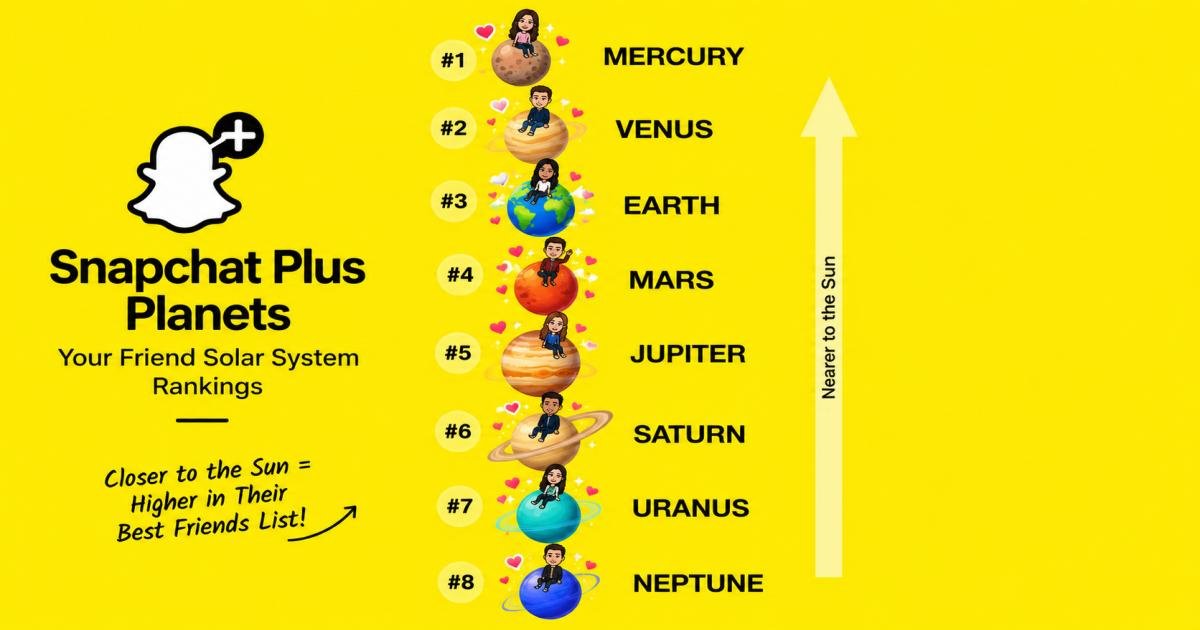

Snapchat Plus Planets show where you rank on a friend’s Best Friends list. Mercury means you are their #1 friend. Venus is #2, Earth is #3, and the order runs down to Neptune at #8. The closer a planet sits to the Sun, the more you two use Snapchat together. You are always the Sun in your own solar system.
The planets come from the Friend Solar System, a Snapchat+ feature. It is off by default, so a new subscriber may see no planets at all.
One idea runs through this guide: a planet tracks app activity, not feelings. Keep that in mind as you read.
Key facts at a glance
- Number of planets: eight, Mercury to Neptune
- Who gets a planet: only your top eight friends
- What you need: a Snapchat+ plan with the Friend Solar System switched on
- Default setting: off
- Can you pick your planet: no, the app sets it
I checked Snapchat’s own statement (quoted by Dexerto) against several how-to guides. Where they disagree, I say so.
What Are Snapchat Plus Planets?
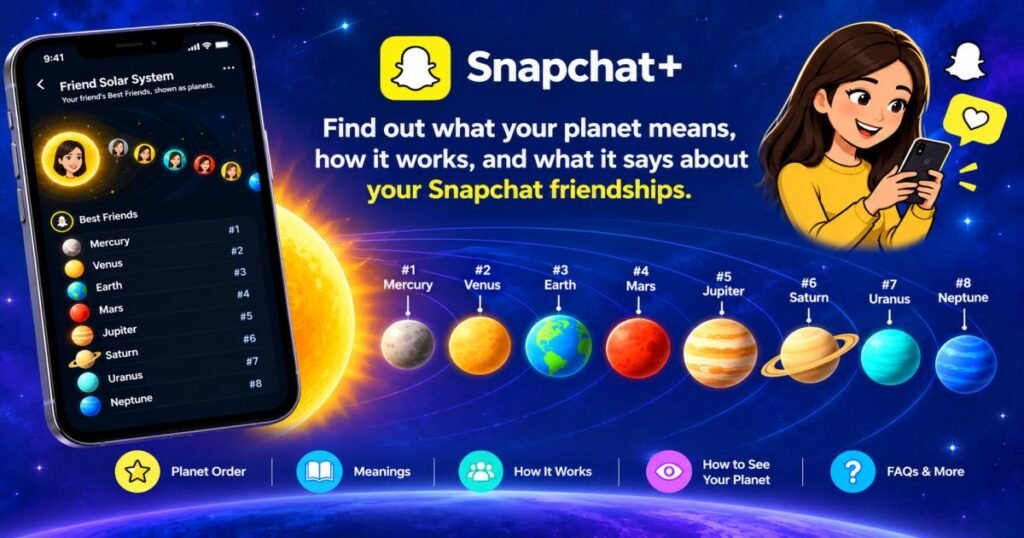
Snapchat Plus planets are small planet icons that show how close a friend ranks to you. They live inside the Friend Solar System, a perk of the paid Snapchat+ plan. You are the Sun, and your closest friends orbit you as planets.
The app used to show friendship level with emojis beside a name. The planets are a more visual take on the same idea. Only your top eight friends get a planet. Everyone else gets none.
Dexerto reports that Snapchat assigns planets based on how often you interact. Several guides add that snaps, chats, and streaks all count. I found no public formula from Snapchat, so treat those details as the best available picture, not a rulebook.
Snapchat Plus Planets in Order: Mercury to Neptune
The order copies the real solar system. Mercury sits closest to the Sun, and Neptune sits farthest. This table is your quick reference.
| Planet | Rank | What it means | How it looks |
| Mercury | #1 | Top best friend | Five red hearts |
| Venus | #2 | Second closest friend | Swirling light brown, multicolor hearts |
| Earth | #3 | Third closest friend | Blue and green, four red hearts, a small moon |
| Mars | #4 | Fourth closest friend | Red with craters, three purple and light blue hearts |
| Jupiter | #5 | Fifth closest friend | Orange swirls, Great Red Spot, no hearts |
| Saturn | #6 | Sixth closest friend | Orange with rings, no hearts |
| Uranus | #7 | Seventh closest friend | Green swirls, no hearts |
| Neptune | #8 | Eighth closest friend | Bright blue waves, no hearts |
Here is a fast way to read them. Only the top four planets carry hearts, and the count drops as you move out. Spot hearts, and you know the friendship sits in the top four.
Mercury: #1
Mercury sits nearest the Sun and marks the top spot. Look for five red hearts around it.
Venus: #2
Venus takes second place. It shows as swirling light brown, ringed by pink, yellow, and light blue hearts.
Earth: #3
Earth is the third planet and the third friend. You can’t miss it. It has blue and green coloring, four red hearts, and a tiny moon.
Mars: #4
Mars is red and cratered, with three purple and light blue hearts. It is the last planet that gets any hearts.
Jupiter: #5
Jupiter is the first planet with no hearts. Its orange swirls and the Great Red Spot give it away.
Saturn: #6
Saturn is the only planet with rings. That makes it the easiest outer planet to pick out.
Uranus: #7
Uranus is green, with swirls in a circular pattern. It sits second to last.
Neptune: #8
Neptune closes the list with bright blue waves. It marks the eighth and final slot.
What Does Each Snapchat Planet Mean?
The table gives you the rank. This section shows how to read it. No planet is a score of the friendship. Each one is a spot on someone’s list of eight, based on app habits.
Mercury: Your #1 Best Friend
Mercury means you top their list. On average, that person chats or snaps with you more than with anyone else on the app. It reflects steady daily contact.
Venus: Your #2 Best Friend
Venus means you sit one step below the top. You talk often, but one other person talks to them slightly more.
Earth: Your #3 Best Friend
Dexerto gives a clean example: if your friend is the Sun and you are Earth, you are their third closest friend. That is a strong place. Most of their contacts never reach it.
Mars: Your #4 Best Friend
Mars is the last spot in the top four. You are a regular contact, though not the main one. Typically, this is where close friends land when they also use other apps to talk.
Jupiter: Your #5 Best Friend
Jupiter puts you in the middle of the pack. You made the cut, but your chats probably come in bursts instead of daily.
Saturn: Your #6 Best Friend
Saturn marks a steady but lighter contact. You show up in their chats now and then, not every day.
Uranus: Your #7 Best Friend
Uranus sits near the edge. You are in, but a few extra snaps from someone else could push you out.
Neptune: Your #8 Best Friend
Neptune is the last slot, and it still counts. You are in their top eight, which most of their contacts are not. If you stop talking for a while, though, this is the spot you would likely lose first.
How Does the Snapchat Friend Solar System Work?
Snapchat ranks friends by how much you interact, then fills eight slots from Mercury to Neptune. Dexerto notes this does not always match real-life closeness, because the app only sees what happens in the app.
Four facts shape how it works:
- You are the Sun. Every solar system belongs to one person.
- Each planet is a friend. Closer to the Sun means more activity.
- The view stays private. You see where you land in a friend’s system. You can’t browse their full layout.
- The app picks every planet. You cannot assign one by hand.
A real example shows the gap. Say you see a friend at school every day and rarely text them. Snapchat sees almost nothing, so that friend may rank low. Meanwhile, a long-distance cousin you snap daily may sit at Mercury. Remember, the ranking follows app activity, not how much you care.
How to See Your Snapchat Planet
You need Snapchat+, and the Friend Solar System switch must be on. Then follow these steps.
- Open Snapchat and update the app if needed.
- Go to a friend’s profile.
- Find the “Friends” or “Best Friends” badge.
- Tap the badge. If you are in their top eight, your planet appears.
Dexerto adds that you and your friend must have linked your Bitmojis first. If the badge or planet is missing, check that first.
One detail is unclear. Some guides say both people need Snapchat+. Others say only you do. I found no clear public statement from Snapchat, so test it with a friend in your own app.
What Do the Snapchat+ Best Friends and Friends Badges Mean?
The badges sit on a friend’s profile and sum up how much you talk.
- Friends badge: you chat with this person regularly.
- Best Friends badge: per Dexerto, you are both in each other’s top eight closest friends.
The badge is the door to the planet. With Snapchat+, tapping it shows your exact place in their solar system. Without Snapchat+, you see the badge and nothing more.
Is Snapchat Friend Solar System Available by Default?
No. The Friend Solar System is off by default, so you must switch it on yourself.
Snapchat made this change after feedback that a low rank can sting. In a statement quoted by Dexerto, the company said it wanted subscribers who want friendship insights to turn the feature on on purpose, while everyone else would never have to see it.
To turn it on:
- Open Snapchat and tap your profile icon at the top left.
- Scroll to the Snapchat+ section.
- Find the Friend Solar System toggle.
- Switch it on.
If you can’t find the toggle, update the app and check that your plan is active. A lapsed plan means no planets. A few guides also say the feature is iPhone-only. Others do not mention it, so check on your own device. Menu names can change between app versions.
Does Your Snapchat Planet Match Your Friend’s Planet?
Rarely. Your planet in their system reflects how they use the app with you. Their planet in your system reflects how you use it with them. Two sets of habits produce two different ranks.
Here is an example. You send ten snaps a day to a friend, so they sit at Mercury in your system. But they talk to three other people even more, so you only show up as Mars in theirs. Neither of you did anything wrong. You just spend your app time in different ways.
Why Did My Snapchat Planet Change?
Planets move because activity moves. These are the usual causes.
- Less chatting. Even one quiet week can shift a rank.
- A new friend. Someone who chats a lot can push others down a slot.
- Ended streaks. Several guides list streaks as one input.
- The feature turned off. You switched it off, or the app reset it.
- Your plan ended. No Snapchat+ means no planets.
One guide notes Snapchat does not send an alert when a rank changes. So a move can go unnoticed until you check again.
Can You Choose or Change Your Snapchat Planet?
No. You can’t pick a planet, trade one, or hand one to a friend. The app sets every position.
You can change the habit behind it, though. Talk to a friend more, and you will typically move closer to the Sun in their system. If you want no part of it, turn the feature off in your Snapchat+ settings. You can do that at any time.
Snapchat Plus Planets vs. the Real Solar System
Snapchat borrowed the real order and added a few playful twists.
- Same order. Mercury is closest to the Sun in space and closest to you in the app.
- Same count. Both have eight planets. Pluto lost its planet status in 2006, and Snapchat has no Pluto.
- Different meaning of “far.” Neptune sits about 4.5 billion kilometers (2.8 billion miles) from the Sun. In Snapchat, “far” only means a lower rank.
- Added extras. Hearts and a small moon on Earth are app decoration. Real planets have no hearts.
So the app uses space as a visual game. It follows real science only in the order of the planets.
Snapchat Plus Planets: Common Misunderstandings
People often read too much into these icons. These myths come up most.
“Mercury means they love me most.” Not quite. Mercury means you rank first in app activity with that person.
“If I’m Neptune, they don’t like me.” No. You made their top eight, which is a small group.
“Everyone can see my planets.” No. You see your own spot in a friend’s system, not the whole picture.
“Paying gets me a better planet.” No. Snapchat+ unlocks the feature. It does not change your rank.
“Planets stay the same.” They shift as activity shifts.
“Every friend has a planet.” Only the top eight do.
Final Takeaway
Your planet is a small signal, not a verdict. Snapchat plus planets show who you talk to most and in what order. They do not show who cares about you.
If you have Snapchat+, switch the feature on only if you want it. Some people enjoy the game. Others find it stressful. Either choice is fine, and you can change it any time. If you spot Neptune on a friend’s profile, treat it as a nudge to send a message, not a reason to worry.
FAQs
What are Snapchat Plus planets?
Snapchat Plus planets are icons in the Friend Solar System, a Snapchat+ feature. Each one shows your rank among a friend’s top eight friends.
What is the Snapchat Friend Solar System?
It is a view where you are the Sun and your eight closest friends orbit you as planets. The closer the planet, the more you two use the app together.
What is the Snapchat planets order?
Mercury (#1), Venus (#2), Earth (#3), Mars (#4), Jupiter (#5), Saturn (#6), Uranus (#7), and Neptune (#8).
What does Mercury mean on Snapchat?
Mercury means you are that person’s #1 best friend on the app. It is the closest planet to the Sun and has five red hearts.
What does Venus mean on Snapchat?
Venus means you are their second closest friend. It looks like swirling light brown with multicolor hearts.
What does Neptune mean on Snapchat?
Neptune means you are their eighth and last closest friend. You are still in their top eight.
How many Snapchat planets are there?
Eight. They match the eight planets of the real solar system. There is no Pluto.
How do I see my Snapchat planet?
Turn on the Friend Solar System in your Snapchat+ settings. Then open a friend’s profile and tap their Friends or Best Friends badge. If you are in their top eight, your planet shows up.